How to build typed decisions with Jev
By Flavio
Updated
Tagged: AI
Learn how Jev turns text into typed choices, scores, and probabilities, with JavaScript examples, practical patterns, limits, and real use cases.
Jev is an API for adding typed decisions to an app. You send it some data and a list of questions with fixed answer options, and it sends back probabilities you can branch on in regular code.
If you still need an account and API key, start with how to get access to the Jev API. This guide focuses on writing good questions and wiring the responses into your code.
Unlike a normal LLM, Jev won’t write replies, explanations, or code for you. Every question gets one constrained answer: a yes/no probability, a pick from a list you define, or a position on a scale you define, always with probabilities attached. It also has experimental image input and a Box type for locating something inside a picture. According to TypeSafe, most calls finish in about 100 milliseconds. Input tokens cost $0.042 per million, and output tokens are free.
With ChatGPT or a coding agent, the AI is the interface or the worker doing the job. Jev sits quietly inside a regular application at the exact spot where your code needs a judgment call.
It’s built by TypeSafe AI, a San Francisco lab that came out of stealth on September 15, 2026 with $40M in seed funding and Jev as its first public model. They call it a System One model, designed for fast decisions inside software instead of chatting with people. On October 9, 2026, TypeSafe announced an $870 million Series A at a $7.5 billion valuation, led by Andreessen Horowitz with Sequoia Capital and existing investor DCVC joining in.
Below, we’ll look at what Jev does, how to call it, how to write questions that hold up, where it breaks down, and where it makes sense to use in a real project.
What Jev is in one sentence
Think of Jev as a smart if statement.
Normal code handles rules you can compute cleanly, like if (order.total > 100). It breaks down as soon as the condition requires judgment. Is this support message angry? Is this email about billing? Which of these 12 buttons continues the checkout?
Historically, you either trained a classifier on labeled data or asked a general-purpose LLM for structured JSON. Jev sits in between: you define the allowed answers at call time, get back a probability for each option, and branch on those numbers in your own code.
To see what that looks like, take a hypothetical sponsor-form submission. You pass the form fields as the state, along with the questions you want answered about that submission:
{
  "model": "jev-latest",
  "state": {
    "opportunity": "link",
    "name": "Managed Postgres",
    "description": "We make a managed PostgreSQL hosting product and would like to sponsor the newsletter in October."
  },
  "questions": {
    "is_sponsor_inquiry": {
      "type": "noul",
      "instructions": "Does `description` ask to sponsor the site or newsletter?"
    },
    "product_category": {
      "type": "choice",
      "instructions": "What kind of product is described by `name` and `description`?",
      "criteria": {
        "dev_tool": "Developer tools, hosting, APIs, SaaS for developers",
        "course": "Courses, books, or training",
        "unrelated": "Anything not aimed at developers"
      }
    },
    "message_quality": {
      "type": "score",
      "instructions": "How specific is the request?",
      "criteria": [
        "Generic template, no reference to this site",
        "Mentions the site but no concrete ask",
        "Concrete ask with a timeframe or product named"
      ]
    }
  }
}
Jev returns a typed response with probabilities for each question. The numbers below are illustrative, while the structure matches the real API response:
{
  "model": "jev-1.13.0",
  "answers": {
    "is_sponsor_inquiry": { "type": "noul", "noul": 0.99 },
    "product_category": {
      "type": "choice",
      "choice": "dev_tool",
      "probabilities": { "dev_tool": 0.97, "course": 0.01, "unrelated": 0.02 },
      "confidence": 0.95
    },
    "message_quality": {
      "type": "score",
      "score": 1.9,
      "legend": {
        "0": "Generic template, no reference to this site",
        "1": "Mentions the site but no concrete ask",
        "2": "Concrete ask with a timeframe or product named"
      },
      "probabilities": { "0": 0.0, "1": 0.1, "2": 0.9 },
      "confidence": 0.86
    }
  },
  "usage": { "input_tokens": 210, "output_tokens": 31 }
}
Notice a few things about that payload:
- There’s no freeform text to parse or clean up.
- Every answer is locked to the options you provided.
product_categorycan only ever come back asdev_tool,course, orunrelated. - All three questions are answered in a single request, and adding a fourth barely changes the latency.
From there, your application code handles the branching with normal conditionals:
const { answers } = response

if (answers.is_sponsor_inquiry.noul > 0.9 && answers.product_category.choice === 'dev_tool') {
  sendRateCard(email)
} else {
  queueForManualReply(email)
}
How Jev differs from ChatGPT, Cursor, Codex and Claude Code
Most AI tools put a generative model front and center. You hand over a broad request, and the model produces something new.
With ChatGPT, you work through a conversation. You ask a question or describe a task, and you get generated prose, code, an image, or the output of a tool call.
Cursor is an editor and agent product that plugs into different models rather than being a model itself. You point it at a repo with a coding task, and its agents read files, edit code, and run commands and tests until they finish.
OpenAI Codex and Claude Code work as coding agents too. Codex ships as an app, a CLI, and cloud workflows, while Claude Code runs in the terminal and other dev environments. You give either one a goal like “add authentication”, and it inspects the codebase, edits files, runs commands, and iterates on its own. Other agentic CLI tools follow that same loop of reading a request, calling tools, checking the output, and deciding what to do next.
Jev skips that whole loop. You don’t give it an open-ended goal, and it never calls tools or touches files. You pass one state object and a list of questions, it returns typed answers with probabilities, and the call is over.
| Tool | What you give it | What comes back | Its role |
|---|---|---|---|
| ChatGPT | A prompt or conversation | A generated response | General assistant |
| Cursor | A coding task, repository, and tools | File edits, commands, test results | Editor and coding agent |
| OpenAI Codex | A coding goal, project, and tools | Code changes and completed tasks | Coding agent |
| Claude Code and other CLI agents | An instruction and local tools | Tool calls, edits, and terminal results | Terminal coding agent |
| Jev | State plus questions with defined answer shapes | Choices, scores, and probabilities | Decision primitive inside software |
Because of that, Jev fits inside those tools rather than competing with them.
A coding agent can ask Jev whether a shell command is read-only, reversible, or destructive before executing it. A model router can use it to pick which model should handle an incoming request. A SaaS app can use it to check whether a support ticket needs a database lookup, an LLM reply, or a human. ChatGPT still writes the message and the coding agent still edits the files, while Jev handles the routing decision in front of them.
That also means you can add AI to a product without turning it into a chatbot or an agent. You keep the app you already have and drop in a single call wherever a plain if statement can’t understand the input.
A lot of those calls end up completely invisible to users. Everyone notices a chatbot or a coding agent because the model is the main interface. A decision model quietly sits inside a support queue, an event pipeline, a spam filter, or a permission check.
It’s too early to say whether decision models will become a bigger market than generative LLMs, though they could easily drive higher call volume. A person opens ChatGPT a few times a day, while an app can make thousands of tiny decisions in the background. The big providers moved fast after Jev launched: within two weeks, OpenAI announced a Decisions API powered by GPT-6 Luna in limited preview on September 29, 2026, and Cloudflare released Clef on October 1, an open-weight decision model that accepts Jev’s request format.
Wiring AI into regular software isn’t new, since developers already do it with small LLMs, embeddings, classifiers, and structured outputs. Jev gives you a model and API built specifically for that job, with low latency, low cost, typed answers, and probabilities by default.
How Jev differs from classifiers and structured LLM outputs
Until now, making this kind of decision in software usually meant picking one of three options:
- Write an
ifstatement, a regular expression, or a decision tree. - Train a classifier for a fixed set of labels.
- Ask a general-purpose LLM for structured output.
Hardcoded rules are fast, cheap, and predictable, until the wording varies and they break. A custom classifier is fast too, though you need labeled training examples, a training pipeline, and a separate model for each task. A general-purpose LLM handles messy text with no per-task training, yet underneath the JSON wrapper it’s still a generative model.
Jev splits the difference. Like an LLM, it takes unstructured text and questions you define on the fly. Like a classifier, it outputs a constrained probability distribution instead of generating free text.
Structured outputs already work well across most LLM providers, either natively or via tool calling, and the Vercel AI SDK gives you a clean interface for them with generateText() and Output.object() validated against your schema.
Even with a schema, though, an LLM still generates its JSON one token at a time. To return {"category": "billing", "urgent": true}, it emits every token in sequence. A schema constrains the output, yet generation can still fail or stop early, which the AI SDK surfaces as structured-output errors. And if you ask an LLM for a confidence number, that score is just another generated token rather than a calibrated probability.
Instead of generating a string, TypeSafe says Jev samples all the answers in parallel, evaluating each question independently against the same state to produce a probability distribution over your options. You still get JSON back over the wire, without having to extract a decision from generated prose.
That architecture is why it’s fast and cheap. TypeSafe quotes 70 to 500 milliseconds end to end, compared to 3 to 329 seconds for frontier LLMs on similar questions. At $0.042 per million input tokens, it’s 5 to 240 times cheaper than LLM input pricing (which runs from $0.20 to $10 per million), and output tokens are free because there’s barely any output to meter. TypeSafe’s headline claim of “193.6x faster, 444.6x cheaper” comes from their own workflow evaluations, which they note sit at the high end of real-world results, so treat those numbers as a ceiling rather than a typical baseline.
The training method is different too. Chat models rely on RLHF or similar techniques that reward answers humans like reading. TypeSafe trained Jev with Reinforcement Learning for Calibrated Decisions (RLCD), tuning it so its probabilities line up with real outcomes. Over a large batch of predictions, answers rated at 90% probability should turn out right about 90% of the time. Any single call can still be wrong, of course, so your code still needs sensible thresholds and fallbacks. Because Jev can’t return a value outside your schema, you at least separate schema errors from wrong decisions.
You do give up text generation on purpose. Jev can’t draft a reply, write code, summarize a document, or explain why it picked an option. Whenever you need generated text, you still call an LLM. In practice, the two pair well: use Jev to classify or route the request, then call an LLM only for the branches that need prose.
Where the name comes from
The System One label comes from Daniel Kahneman’s Thinking, Fast and Slow. System 1 is fast, intuitive judgment, while System 2 is slow, deliberate reasoning. TypeSafe positions Jev in that first bucket and reasoning models in the second.
The name Jev is a nod to William Stanley Jevons, the economist behind the Jevons paradox. When steam engines became more efficient, coal consumption went up instead of down, because cheaper power opened up new uses. TypeSafe is making the same bet on AI decisions: once a decision costs a tiny fraction of a cent, you’ll drop it into parts of your codebase where calling an LLM never made economic sense.
How Jev works under the hood
TypeSafe hasn’t published the architecture in detail, so here’s what matters when you build with it.
Every question in a request looks at the same state. Jev evaluates all of them in parallel and independently, so one answer never leaks into another question’s context. In TypeSafe’s tests, batching questions together produced no drift beyond normal sampling noise.
Because Jev outputs a probability distribution over the options you define, a valid response can’t come back with a malformed value. TypeSafe reports a 0% type-error rate because the output format is enforced structurally by the model. You won’t have to write defensive parsers for broken JSON or invented enum strings, though you’ll still want labeled examples to check whether Jev picks the right option.
By default, your state and all your questions share a budget of roughly 64,000 tokens, and the state plus any single question has to fit inside roughly 32,000 tokens. A Choice question accepts up to 255 options, and a Score accepts anywhere from 2 to 10 levels.
You can pass text as a plain string, a JSON object, or an array. Images work too behind an experimental header, which we’ll look at shortly. If you’re working with audio or video, transcribe it or extract still frames first.
The latest release is jev-1.14.0, announced on October 14, 2026, with general improvements and stronger multilingual support. New releases roll out on jev-preview first, while jev-latest (the SDK default, starting on jev-1.13.0) switches over a week after launch. Check the model reference to see what each alias currently resolves to. Log the versioned model ID that comes back in every response, and pin an exact version once you tune thresholds against it.
The core question types
Jev gives you three stable decision types: Noul, Choice, and Score. Each one returns a slightly different response shape. There’s also an experimental Box type for locating objects in images, which we’ll try right after these.
| Type | The question | What comes back |
|---|---|---|
| Noul | Is this true? | noul, a probability from 0 to 1 |
| Choice | Which of these options? | choice, probabilities, confidence |
| Score | Where on this scale? | score, legend, probabilities, confidence |
Every question takes an ID of your choice, a type, and instructions. Choice and Score require criteria as well, while Noul lets you include criteria optionally when you want to clarify the boundary.
One detail that trips people up at first: the question ID only exists for your code and never reaches the model. Always write the full question inside instructions, because a key like refund_requested won’t be seen by Jev at all.
Noul: a yes/no question
Reach for a Noul whenever you want a yes or no answer, like checking whether a support message asks for a refund or whether a resume mentions Kubernetes. Here’s how a Noul question looks in a request:
{
  "refund_requested": {
    "type": "noul",
    "instructions": "Does the customer ask for money back?"
  }
}
What comes back is a single number:
{ "refund_requested": { "type": "noul", "noul": 0.93 } }That noul field is the probability that the answer is yes. A value close to 1 is a strong yes, close to 0 is a strong no, and around 0.5 means the model puts similar weight on both sides.
Write the question so a high number means yes. “Is the customer calm?” and “Is the customer angry?” both work fine, whereas an inverted question where true means “no” will trip up the model and anyone reading your code six months later.
When the line between yes and no is blurry, add criteria to spell out what each side covers:
{
  "is_urgent": {
    "type": "noul",
    "instructions": "Does the message convey urgency?",
    "criteria": {
      "true": "The sender asks for action today or mentions losing money or customers",
      "false": "No deadline and no consequence is mentioned"
    }
  }
}
Don’t read a 0.5 as “medium”. If you ask “Is this candidate strong in Python?” and get back 0.5, the model is telling you it can’t decide, rather than rating the candidate as average. Use a Score when you want a degree on a scale, and keep Noul questions concrete and checkable, like “Does the resume state the candidate used Python at work?”
Noul responses don’t include a separate confidence field because the probability already gives you the uncertainty signal.
Choice: pick one option
Use a Choice when the answer has to come from a fixed list with no order between the options, like routing a support ticket to a team or picking which of 40 links on a page leads to pricing. Here’s an example request:
{
  "department": {
    "type": "choice",
    "instructions": "Which team should handle this message?",
    "criteria": {
      "billing": "Charges, invoices, refunds, subscriptions",
      "technical": "Bugs, outages, integration problems",
      "sales": "Pricing questions, upgrades, new accounts",
      "other": "None of the above"
    }
  }
}
The response gives you the winning option along with the full probability distribution:
{
  "department": {
    "type": "choice",
    "choice": "billing",
    "probabilities": { "billing": 0.84, "technical": 0.15, "sales": 0.0, "other": 0.01 },
    "confidence": 0.6
  }
}
choice is the top option, probabilities gives you the full breakdown, and confidence boils that distribution down to one number. A dominant winner gives you high confidence, while probability spread across options pulls it down. Here billing comes out ahead, with some leftover weight on technical.
Always include an other or none_of_the_above option if an input might fall outside your list, since Jev has to pick one of the choices you give it. Describe what belongs in each option, explain how close neighbors differ when the boundary is subtle, and test the prompt against labeled examples. I walk through writing labels and measuring their accuracy in how to classify text with Jev.
Score: a position on a scale you describe
Use a Score when the answer sits on a spectrum and you can describe each step clearly, like bug severity or customer frustration. Here’s how you define a severity scale:
{
  "bug_severity": {
    "type": "score",
    "instructions": "How severe is the reported issue?",
    "criteria": [
      "Cosmetic; no impact on functionality",
      "Broken or degraded feature, but a workaround exists",
      "Blocking issue; no workaround exists"
    ]
  }
}
The criteria array runs from low to high, and each entry’s 0-based index becomes its level number. Here’s what Jev returns:
{
  "bug_severity": {
    "type": "score",
    "score": 1.43,
    "confidence": 0.35,
    "legend": {
      "0": "Cosmetic; no impact on functionality",
      "1": "Broken or degraded feature, but a workaround exists",
      "2": "Blocking issue; no workaround exists"
    },
    "probabilities": { "0": 0.0, "1": 0.57, "2": 0.43 }
  }
}
score is the probability-weighted average of the level numbers: 0 × 0.0 + 1 × 0.57 + 2 × 0.43 = 1.43. Because it’s a weighted mean, it can land between two levels. Here 1.43 means Jev sees the bug sitting between a broken feature with a workaround and a blocking issue, leaning toward the workaround. That’s a fair call for an export bug that only hits Safari: switching to Chrome works around it, except for people who only use Safari.
Look at probabilities alongside score. A 1.0 could mean all the weight sits on level 1, or that it’s split 50/50 between level 0 and level 2, and confidence separates those two cases immediately.
When writing Score criteria, describe concrete situations instead of abstract degrees. “Broken feature, workaround exists” gives the model clear evidence to match against. Vague labels like “Moderately severe” or bare numbers give it nothing to anchor on, so probability spreads across the whole scale.
Jev evaluates every level on its own without seeing the level number or its neighbors, so relative phrasing like “worse than the previous level” won’t work.
Stick to one dimension per Score. If a single level asks for “punctual and smart and experienced”, an input that’s high on one trait and low on another has nowhere to land, and confidence drops. Split each trait into its own Score and combine the numbers in your code, which we’ll do later on.
Experimental images and Box questions
TypeSafe groups image features under its “danger zone” flag. You can prototype with them right now, though TypeSafe doesn’t treat them as production-ready yet.
Image input works on both Jev 1.13 and 1.14 when you pass the TypeSafe-Danger-Zone-Images: true header. You can place images in state, instructions, or criteria by referencing entries from a top-level assets map, and the SDKs can wire up those references for you.
Say you want to locate a coffee mug in a photo. A Box question returns the bounding edges of the object. It requires jev-1.14.0 (or an alias pointing to it) along with the images header.
Save a JPEG photo as kitchen.jpg (1024 × 768 pixels stays comfortably within the limits). With TYPESAFE_API_KEY set (see Your first call with curl), send this multipart request linking state.photo to the uploaded file:
curl https://api.typesafe.ai/v1/systemone \
  -H "Authorization: Bearer $TYPESAFE_API_KEY" \
  -H "TypeSafe-Danger-Zone-Images: true" \
  -F 'request={
    "model": "jev-1.14.0",
    "state": {"photo": "f8b6d0c2-kitchen-photo"},
    "assets": {
      "f8b6d0c2-kitchen-photo": {"type": "image", "part": "kitchen-photo"}
    },
    "questions": {
      "mug_visible": {"type": "noul", "instructions": "Is there a coffee mug in `photo`?"},
      "mug": {"type": "box", "instructions": "The coffee mug nearest the sink in `photo`"}
    }
  };type=application/json' \
  -F '[email protected];type=image/jpeg'
The response gives you box.top, box.bottom, box.left, and box.right, each normalized between 0 and 1, along with confidence. Multiply the horizontal values by the image width and the vertical values by the height to get pixel coordinates.
One catch: Box always returns a rectangle, even if the object isn’t in the photo at all. That’s why the request above pairs it with a mug_visible Noul, so your code can ignore the coordinates when the mug isn’t there. Test a few of your own images to pick the right probability cutoff.
Stick to PNG or JPEG files within the documented image limits, because Jev rejects oversized images instead of resizing them for you. Image tokens cost the same per-token rate as text input.
Opt into longer context
If you need more room than the default 64k/32k limits, opt in by sending this header:
TypeSafe-Danger-Zone-Long-Context: trueThat raises both the per-request and per-question limits to 262k tokens on Jev 1.13 and 1.14. The long-context option bills at the same per-token price, though TypeSafe notes that it runs slower and loses accuracy. Strip out irrelevant content before you send it whenever you can.
State: what you give Jev to look at
The state is the data your questions inspect. It can be a plain string:
"My card was charged twice for order A-104."It can also be an object with named fields:
{
  "message": "My card was charged twice for order A-104.",
  "order": { "id": "A-104", "charges": [49, 49] },
  "refund_policy": "Duplicate charges are refunded in full."
}
Or it can be an array, which fits a chat transcript or a list of records.
For most requests, go with an object. That lets you point each question at an exact field using a backticked path:
{
  "policy_supports_refund": {
    "type": "noul",
    "instructions": "Does `refund_policy` cover the situation described in `message`, given `order.charges`?"
  }
}
Wrap field names in backticks with dot-and-index notation so there’s zero ambiguity about which part of the state a question is asking about.
Keep the state lean and send only what the questions need. Accuracy drops as unrelated text piles up, so filter in code before making the request. Don’t pass a customer’s entire ticket history just to score one message, or a whole document to classify a single paragraph. Jev suffers from context rot just like any other model, so trimming the payload on your side pays off directly.
Confidence: when to act and when to ask
Confidence is one of the best things about Jev, because it doesn’t rely on asking an LLM to write a self-reported probability in text.
Every Choice and Score answer includes a confidence score from 0 to 1 based on how concentrated probabilities is around a single answer. You also get the full distribution back, so you can compute your own metric if your use case needs one.
A good starting pattern is splitting confidence into three bands:
- High: handle it automatically.
- Medium: ask the user to confirm or flag it for a quick check.
- Low: hand it off to a human, ask for clarification, or fall back to a slower workflow.
Where you draw those lines depends on what a wrong call costs. Starting with 0.5 as a review floor and 0.9 before any destructive action is a reasonable example, though you’ll want to tune both to your own use case. Here’s how that routing looks with the JavaScript SDK:
const { answers } = await client.systemOne({
  state: userMessage,
  questions: {
    action: choice('What is the user trying to do?', {
      check_balance: 'View the account balance',
      approve_transfer: 'Approve the pending withdrawal',
      support: 'Get help with a problem',
    }),
  },
})

const action = answers.action

if (action.confidence < 0.5) {
  routeToHuman(userMessage)
} else if (action.choice === 'check_balance') {
  showBalance(accountId)
} else if (action.choice === 'approve_transfer') {
  if (action.confidence > 0.9) {
    confirmThenExecute(accountId)
  } else {
    askUserToConfirm(accountId)
  }
}The 0.5 floor catches cases where the model is unsure, and above that you raise the bar as the stakes go up. You can read and adjust those cutoffs right in your code whenever you need to.
Start conservative, run Jev on your real data, plot confidence against accuracy, and dial the thresholds in from there. For a step-by-step walkthrough on picking those cutoffs, read How to use Jev confidence scores.
Is Jev open source? Can you run it locally?
No. TypeSafe hasn’t released Jev’s weights, so you can’t download it and run it on your own machine. It’s a hosted API only, either directly from TypeSafe or through Vercel’s AI Gateway.
There’s no self-hosted or on-premises option either. Your requests aren’t used to train Jev, and zero data retention is available on enterprise plans. The October release added an opt-in to share queries for debugging and catching model weaknesses, and even if you turn that on, TypeSafe still doesn’t train on them.
The open source part is the tooling around the model. Both the JavaScript and Python SDKs live on TypeSafe’s GitHub under the MIT license, along with the agent skill. They also publish system-one-adapter, a Python drop-in that routes the exact same questions to OpenAI, Anthropic, Gemini, or any OpenAI-compatible endpoint so you can compare results side by side.
When you see local projects in this post, only their own code runs on your machine. They still hit the Jev API. Oko, for example, finds files and runs keyword search locally, then sends your question and the matching snippets to TypeSafe for ranking. Passing --no-jev skips Jev and keeps the whole thing local.
You might also come across community models on Hugging Face named Open-Jev or Jev-Style. They copy Jev’s request format on top of open models like Qwen, and some of them work in LM Studio, but they’re separate community projects rather than Jev itself.
The closest self-hostable alternative is Cloudflare’s Clef, released on October 1, 2026 under the Apache 2.0 license. It’s a different model built on Qwen, but it accepts the same requests and returns the same answer shapes, so existing Jev code works once you swap the URL, key, and model name. Cloudflare hosts it on Workers AI. Running the weights yourself takes a datacenter GPU, since Cloudflare tested them on a single NVIDIA H200.
TypeSafe hasn’t published a research paper either. The launch post mentions a new model architecture, a parallel sampler, and the RLCD training method without going into details, calls Jev “neither small nor an LLM”, and notes they skipped public benchmarks. I cover the parts that matter in practice in How Jev works under the hood.
Getting access
Jev started behind a waitlist where most people got in within a day or two. TypeSafe opened it to everyone on September 20, 2026, then paused new signups on September 22 because of demand. Existing accounts keep working. Check typesafe.ai to see if signups are open, or use Vercel’s AI Gateway below. Situations like a paused signup are why I care more about the AI product I can use than the announcement.
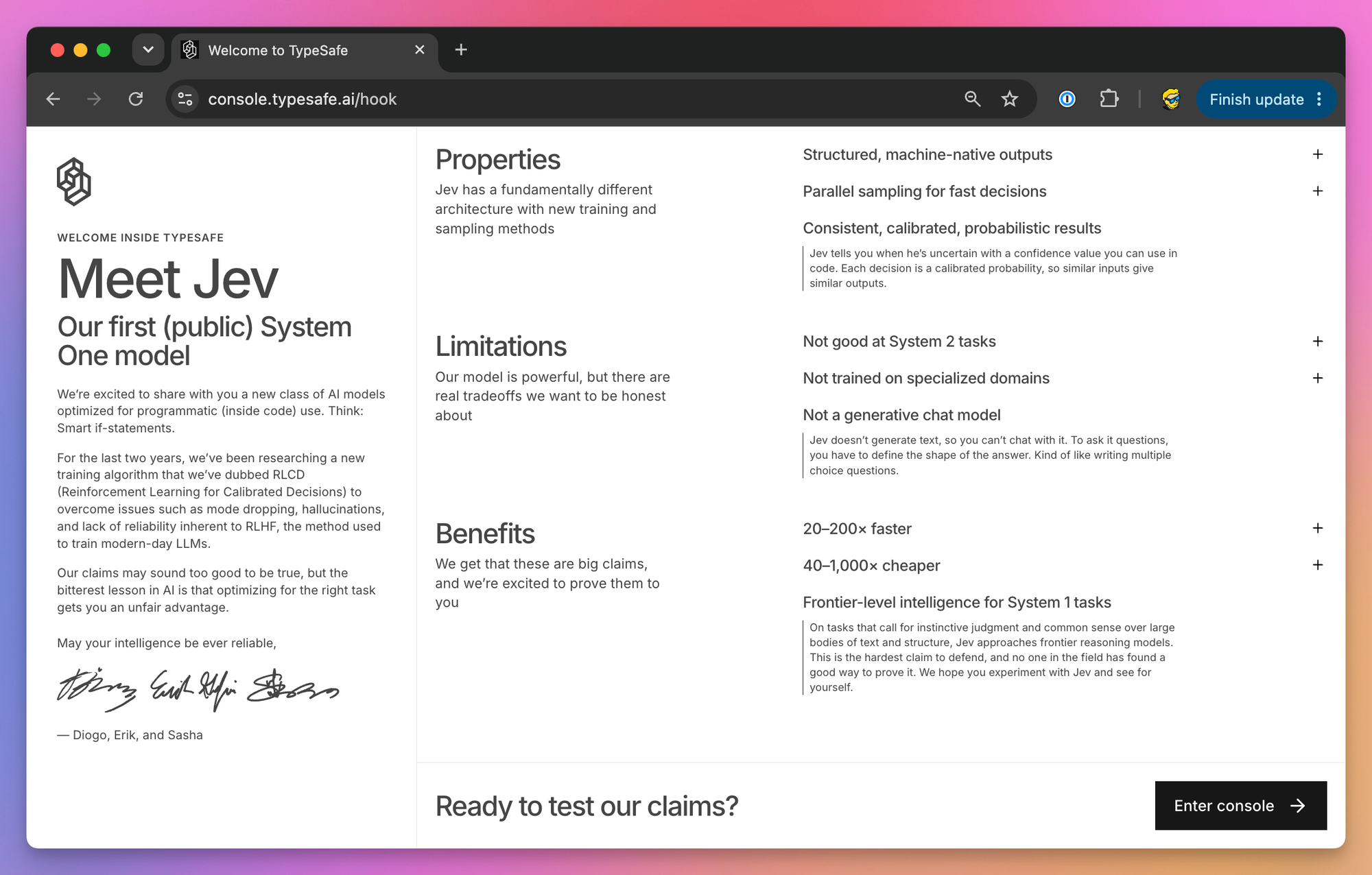
When you open console.typesafe.ai, the first page summarizes what Jev is good at and, to its credit, where it falls short: System 2 tasks, specialized domains, and anything generative.
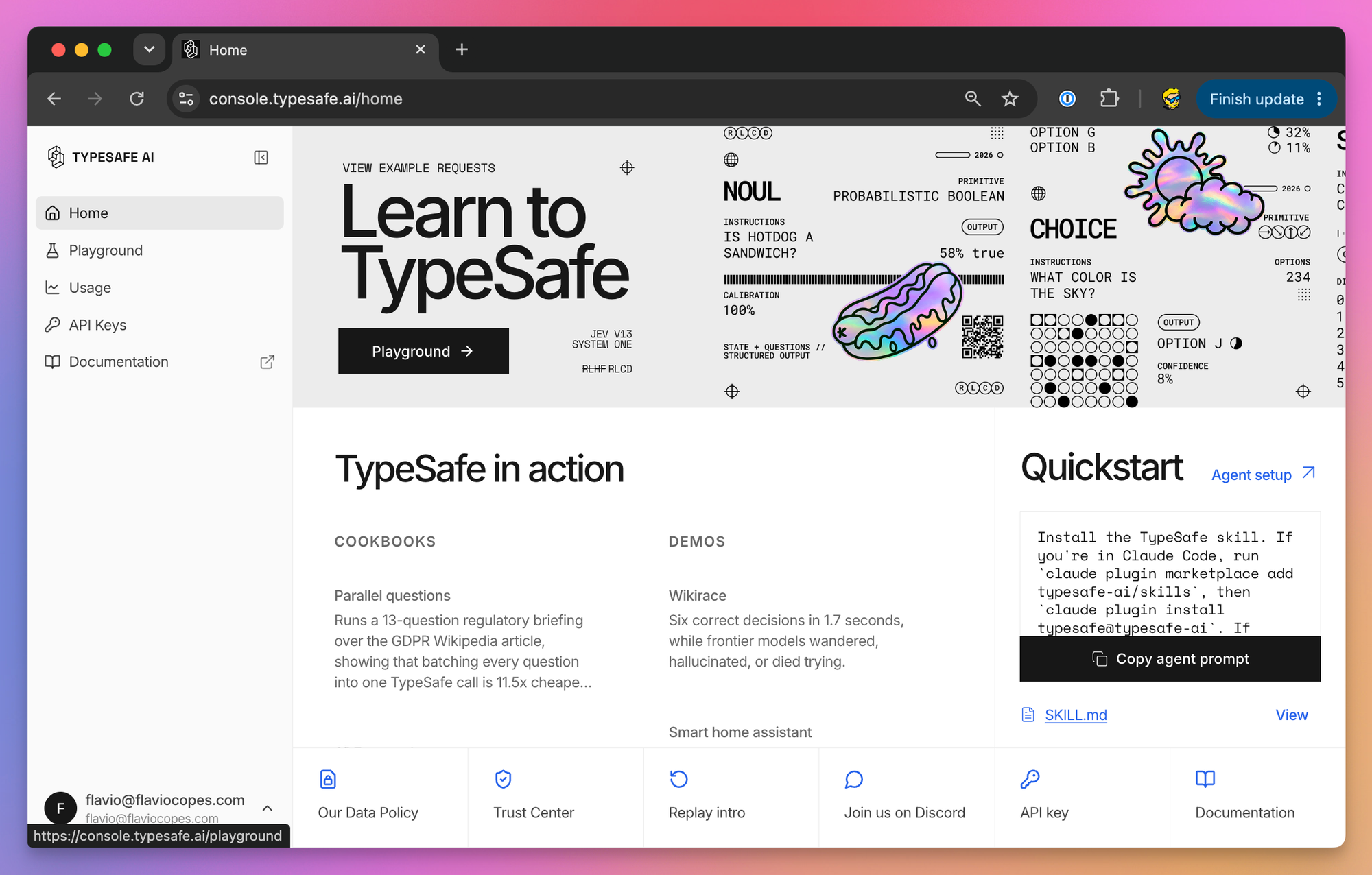
From the console home you can jump into the cookbooks and demos, or grab a one-paragraph prompt to paste into your coding agent so it installs the TypeSafe skill.
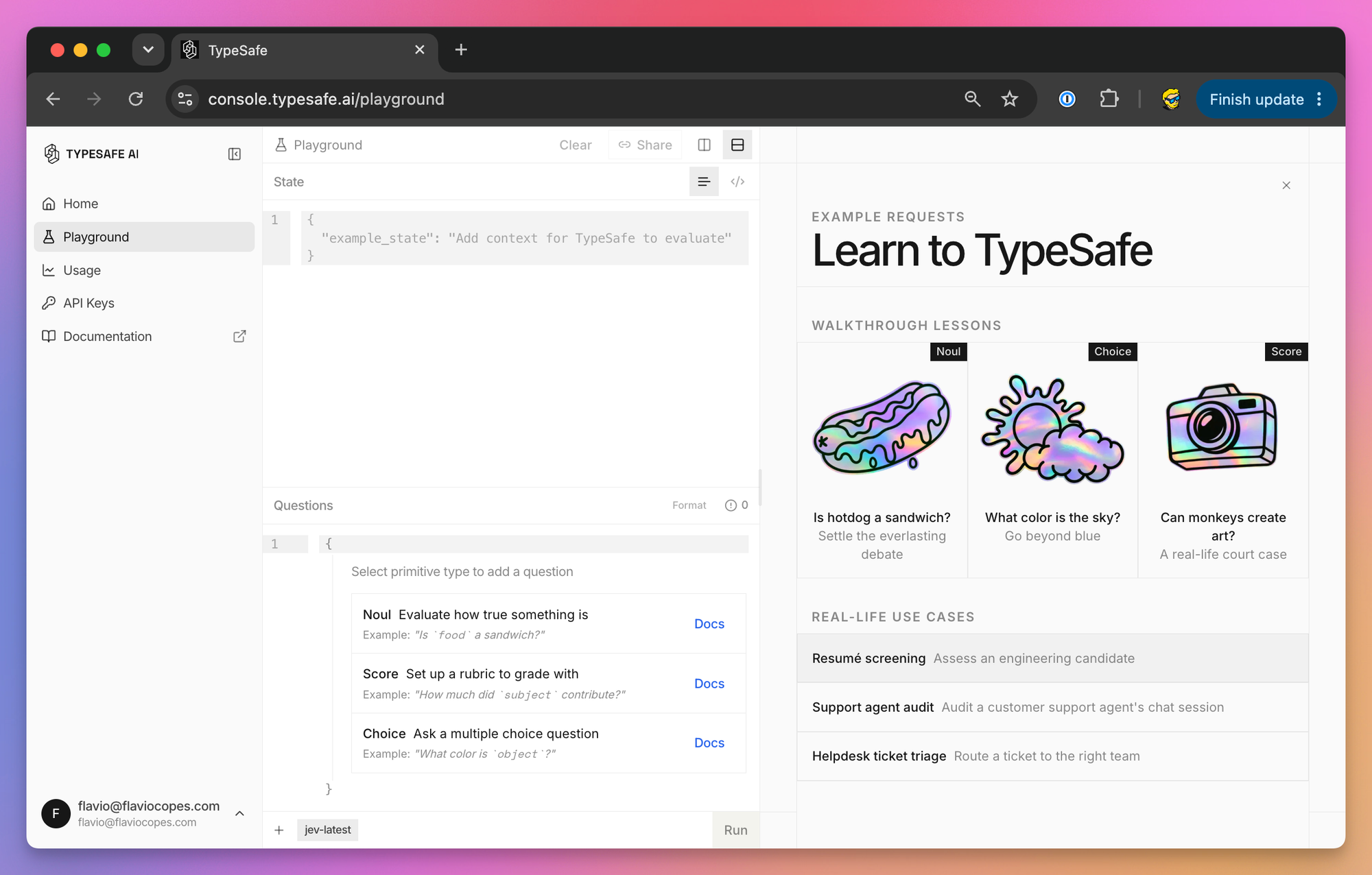
Spend your first hour in the Playground. Paste a state on the left, add your questions, and run them against jev-latest. The right side has a walkthrough lesson for each primitive plus three realistic examples: resume screening, auditing a support agent’s chat, and routing a helpdesk ticket.
You create keys under API Keys in the console, and track token consumption under Usage. I wrote up the full signup and key walkthrough in How to get access to Jev and an API key.
If you don’t have a TypeSafe account, you can still reach Jev through Vercel’s AI Gateway as typesafe-ai/jev for the same $0.042 per million input tokens. That route uses the Vercel AI SDK instead of TypeSafe’s own client, and we’ll look at it below.
Your first call with curl
Every evaluation hits a single endpoint:
POST https://api.typesafe.ai/v1/systemone
Authorization: Bearer <API_KEY>
Content-Type: application/json
Export your API key and send the sponsor-form example from earlier in this post:
export TYPESAFE_API_KEY=your_key_here

curl -s https://api.typesafe.ai/v1/systemone \
  -H "Authorization: Bearer $TYPESAFE_API_KEY" \
  -H "Content-Type: application/json" \
  -d '{
    "model": "jev-latest",
    "state": {
      "opportunity": "link",
      "name": "Managed Postgres",
      "description": "We make a managed PostgreSQL hosting product and would like to sponsor the newsletter in October."
    },
    "questions": {
      "is_sponsor_inquiry": {
        "type": "noul",
        "instructions": "Does `description` ask to sponsor the site or newsletter?"
      }
    }
  }'
You get back the answers object, the versioned model that answered, and usage with input and output token counts.
A few status codes are worth knowing upfront. You’ll get 401 if your key is missing or wrong, 422 when the request body fails validation (with the offending field in the response), 429 for rate limits, and 529 when the service is overloaded. Retry 429 and 529 with exponential backoff, which the SDKs already handle for you.
Rate limits apply per organization. Check the developer console for your requests-per-second and tokens-per-second limits; going over either one returns 429.
To see which aliases your account can pass in the model field, call GET /v1/models. Specific versioned IDs like jev-1.13.0 also work even when they don’t appear in that list.
Using Jev from Node.js
The JavaScript SDK is @typesafe-ai/sdk. It requires Node.js 20 or newer and ships ESM, CommonJS, and TypeScript types. Here’s the short version. For the full walkthrough with install, Noul, Choice, Score, errors, retries, and a complete script, see how to use Jev in Node.js.
Install the package first:
npm install @typesafe-ai/sdkThe client picks up TYPESAFE_API_KEY from your environment. Three helper functions, noul, choice, and score, build the questions, and TypeScript infers the answer types from them:
import { choice, noul, score, TypeSafeClient } from '@typesafe-ai/sdk'

const client = new TypeSafeClient()

const ticket = 'The export button crashes the settings page in Safari. Works in Chrome, but some of our customers only use Safari.'

const { answers, model, usage } = await client.systemOne({
  state: { ticket },
  questions: {
    category: choice('What kind of ticket is `ticket`?', {
      bug_report: 'Something is broken or behaving wrong',
      feature_request: 'Asks for something that does not exist yet',
      billing: 'Charges, invoices, refunds',
      other: null,
    }),
    severity: score('How severe is the issue in `ticket`?', [
      'Cosmetic; no impact on functionality',
      'Broken or degraded feature, but a workaround exists',
      'Blocking issue; no workaround exists',
    ]),
    has_repro_steps: noul('Does `ticket` say how to reproduce the problem?'),
  },
})

console.log(answers.category.choice)
console.log(answers.severity.score)
console.log(answers.has_repro_steps.noul)
console.log(model)
console.log(usage.input_tokens)
Passing null as the description on a Choice option means no extra detail, which works well for a catch-all other bucket.
Because of that inference, answers.category.choice is typed as 'bug_report' | 'feature_request' | 'billing' | 'other'. You get autocomplete, unknown labels fail type checking, and a never assertion gives you an exhaustive switch.
Pass model: 'jev-1.13.0' in the request to pin a version, and pass per-call timeout, retry, and signal options as the second argument to systemOne().
Python in a few lines
The Python SDK is typesafe-sdk and requires Python 3.10 or newer. The full walkthrough is in how to use Jev with Python. Install it with:
pip install typesafe-sdkThe API follows the same shape, using Choice, Noul, and Score classes:
from typesafe_sdk import Choice, Noul, Score, TypeSafeClient

client = TypeSafeClient()

response = client.system_one(
    state="I was charged twice for order A-104. Please refund the duplicate.",
    questions={
        "department": Choice(
            instructions="Which team should handle this?",
            criteria={
                "billing": "Charges, invoices, refunds",
                "technical": "Bugs and integration problems",
                "other": None,
            },
        ),
        "refund_requested": Noul(
            instructions="Does the customer ask for money back?",
        ),
    },
)

print(response.answers["department"].choice)
print(response.answers["refund_requested"].noul)
If you’re writing async code, there’s an AsyncTypeSafeClient as well, plus a configurable retry policy.
Using Jev through the Vercel AI SDK
If your app already runs on the Vercel AI SDK, you don’t need a second client. AI SDK 7 (from 7.0.105 onward) includes experimental_evaluate for this kind of model, with TypeSafe supported natively. I cover the whole setup in how to use Jev with the Vercel AI SDK.
Both packages need Node.js 22 or newer. Install them and set TYPESAFE_AI_API_KEY:
npm install ai @ai-sdk/typesafe-ai
export TYPESAFE_AI_API_KEY=your_key_here
A couple of names change here: the yes/no question is boolean and its result field is probability, while Choice and Score keep their names:
import { experimental_evaluate as evaluate } from 'ai'
import { typeSafeAi } from '@ai-sdk/typesafe-ai'

const result = await evaluate({
  model: typeSafeAi.evaluationModel('jev-latest'),
  state: { message: 'I was charged twice. Please refund the extra charge.' },
  questions: {
    department: {
      type: 'choice',
      instructions: 'Which team should handle `message`?',
      criteria: {
        billing: 'Payments and refunds',
        support: 'Everything else',
      },
    },
    requests_refund: {
      type: 'boolean',
      instructions: 'Is the customer asking for money back?',
    },
  },
})

console.log(result.answers.department.choice)
console.log(result.answers.requests_refund.probability)
Through AI Gateway, you can skip the provider package and pass a string model ID instead. Once AI_GATEWAY_API_KEY is set, the SDK resolves it through the Gateway:
const result = await evaluate({
  model: 'typesafe-ai/jev',
  state: 'The support agent issued a full refund to the customer.',
  questions: {
    refunded: {
      type: 'boolean',
      instructions: 'Was a refund issued?',
    },
  },
  providerOptions: {
    gateway: { zeroDataRetention: true },
  },
})
One note on privacy: zeroDataRetention is a Gateway option on Vercel Pro and Enterprise plans. It stops both Vercel and the provider from retaining your prompt and output after processing, and disallows training on them, though the request still travels to both services. On TypeSafe’s direct service, zero data retention is only advertised for enterprise customers, so don’t assume the same option exists in its own SDK.
TypeSafe’s confidence isn’t placed inside result.answers. You’ll find it at result.providerMetadata.typesafe.confidence, keyed by question ID.
You can also run experimental_evaluate against OpenAI, Anthropic, and Google models through an adapter that prompts them for structured output. That’s handy when you want to compare Jev against an LLM on your own labeled data. Just keep in mind those adapters don’t return probability distributions and their boolean probabilities aren’t promised to be calibrated, so compare them on accuracy, cost, and latency rather than confidence.
Whichever SDK you pick, run the calls on the server. The TypeSafe SDK blocks browser usage by default because putting an API key in client-side JavaScript exposes it.
Ask everything at once
With regular LLMs, calls are slow and expensive, so we’re used to asking one question and branching before asking the next. Coding agents tend to carry that exact same habit over to Jev, which throws away most of the speed and cost advantage.
Jev evaluates every question in a request in parallel against the same state, and each extra question only adds its own tokens. Ask every independent question you might need in one call, even the ones that only matter for certain inputs, and let your code ignore whichever answers don’t apply.
TypeSafe calls this speculative fan-out. In one cookbook, sending 13 questions in a single request was 12.2x cheaper and 10x faster than making 13 sequential calls. That test used jev-1.12 with a 53,777-character document, so most of the savings came from sending that large state once instead of 13 times. Running 13 separate calls concurrently would close the latency gap, not the cost gap. Batching them had no effect on the answers beyond normal sampling noise.
Here’s a support triage example packed into one request. Bug severity only matters for bugs, and the refund question only matters for billing, yet both go in the same call:
import { choice, noul, score, TypeSafeClient } from '@typesafe-ai/sdk'

const client = new TypeSafeClient()

const TRIAGE = {
  category: choice('What kind of ticket is `ticket`?', {
    bug_report: 'Something is broken or behaving wrong',
    billing: 'Charges, invoices, refunds, subscriptions',
    feature_request: 'Asks for something that does not exist yet',
    other: null,
  }),
  bug_severity: score('If `ticket` reports a bug, how severe is it?', [
    'Cosmetic; no impact on functionality',
    'Broken or degraded feature, but a workaround exists',
    'Blocking issue; no workaround exists',
  ]),
  has_repro_steps: noul('Does `ticket` include steps to reproduce a problem?'),
  refund_requested: noul('Does `ticket` ask for money back?'),
  frustration: score('How frustrated is the author of `ticket`?', [
    'Calm, just stating facts',
    'Frustrated but civil',
    'Very angry, strong language, or threatening to leave',
  ]),
}

export async function triage(ticket) {
  const { answers } = await client.systemOne({
    state: { ticket },
    questions: TRIAGE,
  })

  const { category, bug_severity, has_repro_steps, refund_requested, frustration } = answers

  if (category.confidence < 0.6) {
    return { route: 'human', reason: 'unclear category' }
  }

  if (category.choice === 'bug_report') {
    if (bug_severity.score > 1.5 && has_repro_steps.noul > 0.6) {
      return { route: 'engineering', priority: 'high' }
    }
    return { route: 'bug_backlog' }
  }

  if (category.choice === 'billing') {
    return { route: 'billing', refundLikely: refund_requested.noul > 0.7 }
  }

  if (category.choice === 'feature_request') {
    return { route: 'product' }
  }

  return { route: 'human', flag: frustration.score > 1.5 }
}
That single call feeds the entire decision tree. For a feature request, your code ignores bug_severity. You paid a handful of tokens for that question, while the shared state went over the wire once.
Keeping all your questions in one constant right next to the thresholds also makes the logic easy to read and adjust later without hunting across files.
Save a second request for cases where your code genuinely can’t build it until the first answer arrives, either because it has to fetch more data or because the first answer picks the next question’s options. TypeSafe’s skill-suggestion cookbook works that way: one request ranks 182 skills, and a second looks at the full text of the top three and can still reject them all. If a follow-up question could have run against the original state, fold it into the first request.
Compose decisions in code
When a decision depends on several factors, ask one question per factor and combine the numbers yourself in code.
Say you’re prioritizing support tickets. You care about how bad the bug is, how upset the customer sounds, and whether the report has enough detail for an engineer to act on. You can ask for all three Scores in a single request:
const PRIORITY_QUESTIONS = {
  severity: score('How severe is the issue in `ticket`?', [
    'Cosmetic; no impact on functionality',
    'Broken or degraded feature, but a workaround exists',
    'Blocking issue; no workaround exists',
  ]),
  frustration: score('How frustrated is the author of `ticket`?', [
    'Calm, just stating facts',
    'Frustrated but civil',
    'Very angry or threatening to leave',
  ]),
  report_quality: score('How much does `ticket` give an engineer to work with?', [
    'No detail; just says something is broken',
    'Names the feature but no steps or environment',
    'Steps to reproduce or environment, but not both',
    'Steps to reproduce and environment',
  ]),
}

function normalized(answers, id) {
  const topLevel = PRIORITY_QUESTIONS[id].criteria.length - 1
  return answers[id].score / topLevel
}

export async function priority(ticket) {
  const { answers } = await client.systemOne({
    state: { ticket },
    questions: PRIORITY_QUESTIONS,
  })

  return (
    0.6 * normalized(answers, 'severity') +
    0.3 * normalized(answers, 'frustration') +
    0.1 * normalized(answers, 'report_quality')
  )
}
Because the scales have different lengths (a 3-level Score runs from 0 to 2, while a 4-level Score runs from 0 to 3), you divide each result by its maximum value before applying your weights. With 0.6 on severity, severity carries twice the weight of frustration.
TypeSafe calls this composite scoring. If the ticket ranking feels off to your team, you just tweak a multiplier and rerun the batch instead of rewriting a prompt and hoping the model shifts its priorities.
Another common pattern is intent routing, which is where a lot of early Jev setups start. Incoming messages usually belong in different buckets: a database lookup for an order status, an LLM call with the right context, or a human for an angry complaint. You put Jev in front to route each message to the right branch:
const { answers } = await client.systemOne({
  state: { message },
  questions: {
    intent: choice('What does the author of `message` want?', {
      order_status: 'Where is my order, has it shipped, tracking',
      product_question: 'How a product works, compatibility, specs',
      return_exchange: 'Return, exchange, or replace an item',
      complaint: 'Unhappy with service or product, wants a resolution',
    }),
    needs_reasoning: score('How much thought does a good answer to `message` need?', [
      'A lookup or a one-line fact',
      'A short explanation using product knowledge',
      'A judgment call with trade-offs or an unhappy customer',
    ]),
  },
})

if (answers.intent.confidence < 0.5) {
  return routeToHuman(message)
}

switch (answers.intent.choice) {
  case 'order_status':
    return lookupOrder(message) // no LLM involved
  case 'product_question':
    return answerWithLLM(message, PRODUCT_CONTEXT)
  case 'return_exchange':
    return answerWithLLM(message, RETURNS_CONTEXT)
  case 'complaint':
    return answers.needs_reasoning.score > 1 ? routeToHuman(message) : answerWithLLM(message, COMPLAINT_CONTEXT)
}
In that flow, order lookups skip the LLM altogether, two of the intents call an LLM with tailored context, and complaints check the second score to decide between an LLM reply and a human agent. You only pay for the heavier paths when a message calls for them.
You can use the same shape as a model router inside an agent. Ask how much reasoning a message needs and which profile it fits, then send it to your cheap model or your expensive one. One proposed migration shrank a full routing prompt down to just those two questions.
Writing questions Jev answers well
Getting good results out of Jev mostly comes down to how you phrase your questions.
Keep each question focused on a single judgment. “Does this message convey urgency?” works well, while “Analyze this message and decide the best course of action” packs several decisions into one slot. Whenever a question starts weighing multiple factors at once, split it up.
Be literal about the condition you want checked. Jev follows your exact wording, including scoping words, negations, and implied conditions. If you get a wrong answer and find yourself explaining what you meant, put that explanation right into the instruction.
In your criteria, describe concrete situations instead of vague degrees. Spell out what separates one Choice option from the next, or what a specific Score level looks like in practice. When the model keeps hovering between two levels on inputs that look clear to you, switch each level to an object with a description and a few examples, using the same field names on every level:
{
  "what": "Broken or degraded feature, but a workaround exists",
  "examples": ["export fails in one browser but works in another"]
}
TypeSafe’s docs tested this on a Safari export bug. Plain string levels returned 1.43 at 0.35 confidence, while adding one relevant example moved it to 1.03 at 0.96 confidence. Swapping in an unrelated example left the result stuck at 1.43 and 0.35, so the examples only help if they look like your real inputs.
Give the model an exit whenever inputs might fall outside your buckets. Add an other option on any Choice that might not cover every case, and include “not stated” when you’re pulling out a detail that might be missing. Make sure your instructions and criteria say the same thing in plain language, because any mismatch between them hurts accuracy.
Keep numbers, dates, and counting in your own code (I’ll get into why in the next section).
On the code side, put all your questions and thresholds in one file so a human can review them in a single place. Before trusting a threshold, run a set of labeled examples where you already know the right answers and check where confidence and accuracy drift apart. One early test got 11 out of 11 invoice cases right once the rubric was written down first.
Where Jev breaks
TypeSafe publishes a “jaggedness” page for each model version listing what jev-1.13 struggles with, along with how to work around each limit.
The first gotcha is literal reading, which we just covered. If a question depends on reading between the lines, spell out the rule explicitly or split the interpretation into two straightforward questions.
Math and counting are another weak spot. Jev can’t reliably calculate numbers or count characters, occurrences, or items in a list. It also can’t tell whether two hex colors are close: named colors work fine, while #FF4B0A doesn’t. Do any arithmetic in code and pass Jev either the result or a named bucket.
If you need to count how many items match a semantic condition, ask one Noul per item and sum the true answers in code:
const items = ['typesafe', 'apple', 'california', 'banana', 'orange']

const questions = Object.fromEntries(
  items.map((_, i) => [`item_${i}`, noul(`Is \`items[${i}]\` the name of a fruit?`)])
)

const { answers } = await client.systemOne({ state: { items }, questions })

const fruits = items.filter((_, i) => answers[`item_${i}`].noul > 0.5)
console.log(fruits.length) // 3
Be careful how you interpret Score numbers, too. Because the levels are weakly calibrated against each other, a 1.4 doesn’t mean “40% of the way from frustrated to angry”. Use a Score to clear a threshold or rank items against each other rather than trying to measure an exact distance.
Dates run into the same limitation because Jev reads them as plain text. Figuring out which date comes first, how far apart two dates are, or whether one falls inside a window is unreliable, and mixed formats or relative references make it worse. Pull out the parts with a Choice over months, days, and years (plus a “not stated” option), build a real date in code, and compare there.
Indirection hurts accuracy as well. Double negatives, a property of a property, or anything with multiple hops makes the model stumble, so point directly at the slice of state that matters.
Dumping a large state full of irrelevant detail does the same thing. Filter it down before calling Jev. When you can’t filter it deterministically in code, ask a Noul per chunk (“is this relevant to the question?”) and drop whatever comes back false.
Keep in mind that a Choice always returns one of your allowed destinations, even when it picks the wrong one for that input. Version your model, questions, criteria, and thresholds together, and replay a set of known inputs whenever any of them change.
Prompt injection is still something to test for. Even though state is treated as data, text written to steer the model can still move the answer. TypeSafe expects to improve on adversarial content, so for now, write precise criteria and test with hostile inputs before going public.
Watch out for instructions and criteria that contradict each other, like a Noul where true means “no”, because that quickly degrades the answers.
Finally, Jev can’t write free text. You can force text out by chaining Choices over characters, though the docs are blunt that it works slowly and poorly. To extract a value, pull the candidates with a regex or an LLM first and let Jev choose among them.
A good rule of thumb is that with Jev you pick a card from the deck instead of asking it to name one. Whenever your instinct says “extract X”, rephrase it as “here are the candidates for X, which one is it?”
What people are building with it
Most of what’s out there right now comes from the launch rush, so it helps to separate weekend demos from teams running Jev on real traffic.
If you want to browse what people have made, check out shipwithjev.com. It’s an independent catalog with no ties to TypeSafe, listing 551 builds grouped by category, and plenty of entries include the cost and latency their authors observed on their own runs.
The first production report came from Metaview, a recruiting platform. Their team said they rolled Jev out to every agent on the platform over a single weekend, cutting candidate searches in their sourcing product from minutes down to seconds. That’s roughly 10x faster, with the same accuracy and a lower cost per search.
Another production story is the Jack & Jill case study, where they swapped out Gemini for Jev in their first-pass candidate screening. Cost per 1,000 candidates dropped from $0.755 to $0.092 (around 88% cheaper), and median screening time per role went from 20.3 seconds down to 10.3. They ran an offline check across 150 live roles and saw comparable quality. The headline $500,000 annual savings projection bakes in expected volume growth, while the savings at their current volume work out to $265,000 a year.
Labeling data
Bulk labeling is where most people start. One demo sorted 1,018 summarized AI research papers into 24 topics for $0.08 total at a 256 ms median per paper, while the LLM summaries themselves cost $3.99. Someone else ran 98,000 listing classifications in ten minutes, and another builder processed half a million input tokens for about two cents, right in line with the published pricing.
Resume screening follows the same pattern, except you give it a rubric and ask for a Score on how well a candidate fits a job posting. One hiring site reported spending about a tenth of what small LLMs cost for that step, and TypeSafe includes resume screening as a built-in example in the console.
You can flip that around too. One developer ran his own resume against all 6,245 Y Combinator companies in 25 seconds for $0.37 and walked away with 156 founders worth emailing.
Inbox triage works the same way: one call per email to check priority, spam, and whether it needs a reply, fast enough that you can watch it chew through a mailbox in real time.
Marketing and research teams are running similar batch passes. One teardown analyzed 724 live ads across 37 brands in around 40 seconds for nine cents, extracting the hook, format, offer, call to action, and awareness stage while flagging mismatches with the landing page. A survey research product rebuilt on Jev (200 samples, 12 questions per survey) reported running twice as fast as Gemini 3.5 Flash-Lite at 85% lower cost.
Routing and verification
Putting a fast Jev call in front of a support flow or an agent is one of the most common ideas people bring up. You use it to route incoming messages to the right handler or pick which model should take over.
The same setup works for internal workflows. A deal-review demo reads a sales deal and figures out what needs to happen next, whether that’s approval, requesting more documents, or looping in sales, finance, and legal. Since a single deal can involve several teams at once, Jev maps out who needs to see it while humans still make the final decision.
On the verification side, one proposed podcast workflow uses an LLM to write episode summaries, then runs a Noul on each claim against the raw transcript and flags low-probability answers for review in code. Another developer dropped Jev into a coding agent loop with one job: answering “is the task done?” every time the agent checks if it can stop.
Podcasts pop up again in MinusPodJev, a plugin for MinusPod, which is a self-hosted server that strips ads out of podcast audio. It runs one Noul per transcript segment, stitches the flagged segments into ad spans, and returns the exact OpenAI-compatible payload MinusPod expects. You still need a regular chat model for chapter titles since Jev can’t generate free-form text.
For pull requests, you can run Scores and Nouls on each modified file to check security risk, complexity, bad practices, and commit message quality, then roll those numbers into a risk matrix in your own code. TypeSafe’s cookbooks also cover retrieval checks: re-ranking BM25 shortlists with a Noul per query-passage pair, scoring passages for relevance and hidden prompt injections before passing them to the answering model, and verifying whether a citation backs up its claim.
Search
Several open source search tools have converged on the same two-step setup: run a cheap keyword pass to gather candidates, then let Jev re-rank them by what the user meant.
jevsearch is a drop-in site search for React and shadcn/ui. You get keyword hits on the first keystroke, and Jev re-ranks the top candidates by intent without needing embeddings or a vector database. If TypeSafe is slow or unreachable, the keyword results stay on screen. The author reports a 278 ms median and $0.26 per 1,000 uncached searches. Most site search setups, including the Pagefind search on this site, stop after that first keyword pass.
JevQL brings the same pattern to plain PostgreSQL by letting you mix a jev() filter into regular SQL:
SELECT title, organizer
FROM meetings
WHERE jev(meetings, 'could have been an email')
  AND starts_at > now();
The JevQL CLI evaluates the jev() parts and sends ordinary SQL to the database, so you don’t need to install any database extension or ask for superuser access. It also ships with SDKs and an MCP server. Every row that reaches a jev() filter is a paid call, so narrow things down with regular SQL conditions first and run --explain to check the estimated cost before hitting the API.
Oko applies this to code search. It runs locally, grabs candidate snippets, ranks them with Jev, and hands the best matches to Codex, Claude Code, or OpenCode over MCP so the agent wastes fewer tokens reading unrelated files. On a public benchmark of 345 code-retrieval tasks across six languages, it ranked a right file first more often than other published methods (MRR 0.39 versus 0.24), and in the authors’ own tests agents finished tasks 12 to 38% faster.
You see the same idea in smaller utilities too. One settings finder lets you describe what you want to tweak and jumps straight to the matching control. A CLI wrapper adds meaning-based “Did you mean?” hints, so typing git record suggests git commit, something a regular typo-distance check would never catch.
Inside apps that already exist
Some of the most practical builds tuck Jev into an existing app as a single decision step.
Spliit Cloud, an open source expense splitter, uses a Jev Choice to suggest a category for each new expense. It checks its local dictionary and the group’s past expenses first, and whenever Jev has low confidence, the user reviews the suggestion. That’s the same boundary I walk through in the Shared Expense Tracker exercise below.
A Magento 2 module runs a fixed set of Nouls and Choices whenever an order, customer, product, review, or abandoned cart is saved. All the questions for that entity go out in a single API call, and the module saves the answer, confidence score, and full probability breakdown right on the record so store admins can see them.
A Word house-style formatter splits the job across two models. An LLM reads your style guide once to describe each style, and then Jev goes through a contract paragraph by paragraph and picks which style belongs on each one.
Real-time interfaces
At a few hundred milliseconds per call, you can fire Jev whenever someone pauses typing. One editor demo scored tone, conviction, urgency, and whether a passage reads as AI-written live as you type, using whatever criteria the developer defines instead of a fixed detector.
Someone else built a browser extension that checks every post in a social feed for rage bait, crypto promotion, or political arguments, hiding the ones that score high. You pick the categories you want filtered out yourself.
Games showed up right away too. People wired Jev into Tetris to choose between rotate, move, and drop, and into a driving simulator that sends structured observations and asks whether to accelerate, brake, or turn. TypeSafe’s launch demos included a Doom bot running on structured game state at about ten queries a second (roughly $7 an hour) and a Wikiracing bot picking from hundreds of links per step without ever hallucinating a link that isn’t on the page.
A Pac-Man demo makes the loop easy to picture: on each tile, the app sends the surrounding game state, Jev replies with a direction, a strategy, a danger score, and flags like trapped or committed, and code moves the character before sending the next tile’s state.
A few robotics experiments tried the same split. One dual-arm robot project puts Jev in the middle of three control layers, handling high-level decisions at around 500 ms and half a yen per attempt while inverse kinematics and physics stay in regular code. Another builder hooked a simulated traffic light up to near-real-time traffic feeds for under a cent total, and said their favorite moment was watching it decide to do nothing.
Beyond those, people have thrown together demos for a Rubik’s Cube, an experimental programming language, natural-language database search, browser and OS control, speech-to-text cleanup, fraud detection, and classifying scraped content. Most of these are quick prototypes to see what fits the typed-decision model.
Agents and tools
One chatbot demo skipped generative LLMs altogether. In a single call, it asked Jev “which tool answers the user’s last message?” as a Choice, along with Choices for the arguments (city, time frame, unit) pulled from candidates in the conversation, and then ran the matching tool in code. It turned off a smart-home light from a plain sentence in about 300 ms end to end, and answered “how tall is Mount Rainier?” by fetching Wikipedia and letting Jev point to the sentence containing the answer.
Browser automation fits this split well. A planner LLM decides the high-level goal, and Jev chooses which interactive element to click next. One demo booked a flight in roughly seven seconds, which feels huge if you’ve ever sat watching a Playwright agent pause for ten seconds between clicks.
Hunch, an open source browser agent, is built around that exact architecture. Jev takes an accessibility snapshot of the page and picks the next action, code verifies the outcome, and anything uncertain or irreversible gets handed off to an LLM. Its author reports a 153 ms median per decision, 24 out of 24 correct decisions, and a four-step form completed in 3.4 seconds. Jive uses the same approach for a terminal coding agent, letting frontier LLMs handle planning and exceptions while Jev makes the routine decisions in between.
You can also build a semantic linter for a large codebase this way. Split changed code into chunks and ask Jev whether each chunk needs attention, what kind of issue it has, and how risky it looks. Rank the results and send only the top chunks to a coding model that can explain and fix them. When a chunk doesn’t have enough context, you can offer options like open_file, previous_chunk, or next_chunk, fetch what Jev asks for in code, and run a second pass before handing anything to the editing model.
Log triage is an easier place to start. Instead of paying an LLM to explain every log line, ask Jev which entries look like normal noise, a forgotten scheduled job, a user-facing failure, or something that needs a closer look, then let your code group and rank them before paging a human or calling a larger model.
For natural-language PostgreSQL search, keep query generation in your own code. Expose a set of allowed query templates, tables, columns, and filters, let Jev pick the user’s intent and options, and assemble a parameterized query yourself so the model can never invent an arbitrary SQL statement.
The first use case I want to test myself is guardrails for coding agents, classifying every shell command as read-only, reversible, or irreversible before it runs. In an early shadow test, an ambiguous rm -rf came back as “irreversible” at 0.56 with a confidence of 0.33. With confidence that low, your code knows to stop and ask a human before running anything.
And just for fun, someone built a startup idea judge that runs ten questions covering problem, demand, monetization, distribution, and differentiation in about half a second, then combines the scores in code into kill, fix, or ship. How useful it is comes down to how sharp your rubric questions are.
Feature engineering
You can also use Jev to turn unstructured text into numeric features for a classical ML model. TypeSafe’s feature-discovery cookbook starts with 18 questions, refines them up to 38 over five rounds, and turns the answers into 67 numeric columns for a CatBoost regressor.
The skeptical notes
When you look at these numbers, focus on cost per solved task rather than cost per token. If a cheap call forces retries or adds manual review, the savings disappear quickly. Most long lists of launch-week demos eventually narrow down to two or three integrations that get steady traffic, and whenever plain deterministic code already makes the right call, stick with code.
All the cost and latency figures above, including the production reports, come straight from the builders or TypeSafe’s own case studies. Demos show you which problems fit a typed-decision API, while finding out which ones pay off under live traffic and stay accurate across model updates takes your own production measurements.
Jev and coding agents
If you’re going to let a coding agent wire Jev into a project, install TypeSafe’s agent skill first. Without it, models trained on standard LLM APIs tend to ask one question per request and make up API fields that don’t exist.
Here’s the install command for Claude Code:
claude plugin marketplace add typesafe-ai/skills
claude plugin install typesafe@typesafe-ai
If you’re using Cursor, Codex, or another agent, run this instead:
npx skills add typesafe-ai/skills --skill typesafe-aiThe skill points your agent straight at the live docs (Mintlify returns any doc page as plain Markdown if you add .md to the URL), gives it the list of primitives, and walks through fan-out and confidence gating.
A good way to kick things off is the prompt TypeSafe recommends:
Using the TypeSafe skill, explore the project and find opportunities for using
intelligent judgement to stand in for complex parsing or other fragile code.
Read through what the agent proposes before you let it touch any code, and tell it to put all the questions and thresholds in a single file. Coding agents are usually pretty rough at wording good questions on the first pass, so you’ll want to refine them together.
How I will use Jev in my workflows
I have access to the console, though I haven’t wired Jev into anything live yet. The plan is to start with decisions I already handle every day, run Jev quietly in shadow mode next to what I do now, and check its answers against mine before handing it any real control.
Route work before starting a coding agent
I run coding agents on all sorts of tasks, from quick one-line fixes to long research sessions, browser automation, and work spanning multiple repos. Throwing the same heavy model and environment at all of them is a waste.
The idea is to pass Jev the task description, the repo name, and a short summary of the agents I have set up. A Choice picks the route (deterministic_script, fast_agent, reasoning_agent, browser_agent, or human), a Score rates how ambiguous the request is, and a Noul checks whether the job needs apps I’m already logged into on my computer.
Jev never launches an agent on its own. My own code reads the response, checks the confidence thresholds, and hands the task off to the workflow I already use.
Put a safety check in front of shell commands
Before a coding agent executes a shell command, my wrapper can send Jev the command itself, the current working directory, and a bit of repo state.
A Choice labels it read_only, reversible, or irreversible. A few Nouls check whether it deletes files, rewrites Git history, deploys to production, or reaches outside the repo.
To start, I’ll just log what Jev says without changing how approvals work. Once I’ve collected enough real runs to trust the numbers, high-confidence read-only commands can go straight through, while anything destructive or uncertain still pauses to ask me.
Prefilter the blog maintenance work
This site has over 2,000 posts, and plenty of them mention software versions, pricing, service limits, and links that go stale over time.
It’s tempting to ask a model “is this version number outdated?”, except comparing 18.17.1 to 24.15.0 is a job for plain code.
Where Jev fits is one step earlier, scanning each paragraph to flag what even needs checking:
- Does this paragraph contain a version claim?
- Does it state a price or usage limit?
- Does it describe a product interface that may have changed?
- Would checking this claim require current external documentation?
Normal code then gathers every paragraph that crosses the threshold and passes only those to a script or coding agent to verify against live docs. That keeps Jev focused on filtering the backlog instead of rewriting posts.
Sort sponsor inquiries and newsletter replies
My sponsor form already processes structured submissions through a Cloudflare Pages Function. Adding Jev there takes a Noul to check if it’s a real sponsorship inquiry, a Choice for the product category, and a Score for how specific the message is.
The first step is just attaching those tags to the notification email I already get while I keep handling every inquiry myself. Once the labels prove reliable, my code can draft the matching reply or attach the right rate card for me to review, without sending anything on its own.
Newsletter replies can run through a lighter version of the same setup: a single Choice separating thank-yous, broken links, questions, sponsorship leads, and other, so the messages that need a reply bubble to the top.
Add semantic priority to Events Logger
Events Logger pulls events from my apps into a single dashboard. Every event carries a project, category, and title, along with an optional description and tags.
I can tack on a Score for severity plus Nouls that flag whether the event is a user-facing failure, lost money, or something that needs action. The main feed stays chronological, and a second view sorts by semantic priority.
That makes it an easy place to test Jev in production first, since the worst case for a bad call is a misordered dashboard row, never touched data or broken infrastructure.
Try it in the Bootcamp projects
The Bootcamp projects are also a great way to show where a decision model fits. Instead of making Jev a day-one requirement, it works better as an optional add-on once the core app already runs.
Every project has at least one spot where regular code handles the hard facts and Jev can take care of a fuzzy call:
| Bootcamp project | What to ask Jev | What stays in code |
|---|---|---|
| Personal Dashboard | Which existing category best fits a new link? | URL validation, storage, editing, and ordering |
| Events Dashboard | Is this event expected noise, a user-facing failure, or something urgent? | API authentication, event ingestion, search, and charts |
| Shared Expense Tracker | Which expense category fits this description? | Amounts, balances, splits, and who owes whom |
| Live Chat Room | Is this message spam, abusive, or likely to need moderation? | Authentication, rooms, message delivery, and mentions |
| Recipe Finder | Does a generated recipe respect the requested diet and ingredients? | Recipe generation, caching, bookmarks, and image loading |
| Port Pilot | Does this process look safe to stop, uncertain, or likely to be a system service? | Reading ports and processes, parsing exact values, and sending signals |
| Recipe Finder Pro | Which model should handle this recipe request based on its complexity? | Payments, subscriptions, entitlements, and access control |
| Your Own Product | Which fuzzy decision inside this product would benefit from a typed probability? | The product’s main workflow and every deterministic rule |
The Shared Expense Tracker draws a clear line. Jev can look at “pizza with Luca and Sara” and suggest food, while your code handles all the math for who owes what because those numbers have to be exact.
Port Pilot keeps an even tighter leash. Jev can attach a risk badge next to a running process, never kill it. Querying the OS, checking PIDs, and asking for confirmation all stay in code.
Recipe Finder pairs both kinds of models together. The LLM generates the recipes as usual, and Jev checks whether the output respects the diet and uses the given ingredients, or whether to try again.
Every project can follow the same short exercise:
- Finish the deterministic version first.
- Pick one decision that depends on understanding meaning.
- Define the possible answers before you call Jev.
- Gather at least 20 realistic inputs along with the answers you expect.
- Run Jev in the background without changing how the app behaves.
- Look at where it missed and tighten the questions.
- Automate only the low-risk path.
Each Bootcamp week still stays centered on its main topic, whether that’s databases, APIs, authentication, real-time data, AI generation, CLI tools, or shipping a product. Jev is just an extra tool you pull in when a project runs into a judgment call.
How I will roll this out
For each of these workflows, I’m going to stick to the same rollout steps:
- Keep the existing behavior untouched.
- Run Jev alongside it and log the full responses.
- Mark the cases where its call was right or wrong.
- Tune the questions and confidence thresholds from that log.
- Automate the low-risk path first.
- Leave uncertain cases for a human or a stronger model.
Where I won’t reach for Jev is writing copy, summarizing text, or doing exact math. Experimental image input is out now too, though I’ll keep that in prototypes until I’ve tested how accurate it is. And if a regular if statement already handles a rule cleanly, leave it alone. There’s no point paying for a model call that might get it wrong when plain code already works.
What it costs, and how fast it is
Jev is priced at $0.042 per million input tokens, with output tokens free. On the homepage TypeSafe writes that as $42 per billion tokens, which is the same rate expressed at the scale they’re aiming for.
In their examples, a support ticket plus its questions comes out to about 300 tokens. That works out to roughly $0.0000126 per call, or $1.26 for 100,000 similar tickets. If you want to compare that against an LLM for your own numbers, you can plug the same per-million rates into the token cost calculator or the inference cost tool here on the site. I also broke down billing, workload estimates, rate limits, Vercel pricing, and LLM comparisons in How much does Jev cost?.
If you go through Vercel’s AI Gateway, the rate is the same and gets billed alongside your other Gateway models.
For latency, TypeSafe reports 70 to 500 milliseconds end to end, with most requests landing around 100 ms when measured from the US West Coast where the servers sit. Calling it from Italy adds network round-trip time on top of that, so test from where your users or servers live before tying it to an interactive UI. As for the 40x to 200x speedup claim, that depends heavily on which LLM and task you’re comparing against, and TypeSafe notes that those headline numbers are the upper end.
Rate limits vary by organization, so look up your current allowance in the developer console before kicking off a big batch job.
Could Jev cut an AI bill by 50 or 60 percent?
It can, depending on what you’re spending money on right now. Jev only shrinks the slice of your bill that goes toward decisions it can take over.
Here’s the quick math to estimate it:
total savings = classification share × savings on those callsSay a team spends $10,000 a month on AI, and $6,000 of that goes to classification, routing, scoring, and verification. Moving that work to a path that costs 5% as much saves $5,700, which is 57% off the total bill.
On the other hand, if classification is only 10% of your spend, even dropping those calls to zero only saves you 10%.
Where the numbers get dramatic is high volume. If you’re running a general-purpose model across hundreds of millions of records just to make one small judgment per item, shifting those checks to Jev frees up your budget and keeps frontier models focused on reasoning and text generation.
Just make sure you price out the whole pipeline, including preprocessing, retries, failed calls, human review, and any generative step before or after Jev. In the research-paper example, Jev classification cost $0.08 while the summaries still ran $3.99.
Experimental image input counts as input tokens too. Audio and video still need preprocessing first, like transcription or extracting still frames, so include that step in your cost estimate.
Where to start
If you already have a TypeSafe account, sign in at typesafe.ai. Otherwise you can go through Vercel’s AI Gateway with a Vercel account while TypeSafe’s direct signups are paused. How to get access to Jev and an API key walks through both options.
Skip the built-in demos and spend your first hour in the Playground testing your own messy inputs, like a real support message or a log entry from your app.
Once you see how it behaves, pick one boring rule in your codebase that relies on hardcoded checks or a fragile regex. Swap in a single Noul or Choice, log its confidence scores next to your current logic for a week, and let it take over once the numbers look solid.
Want me to talk about your product? You can sponsor this site.
Related posts about ai: