Welcome to the official blog for the Plugins Team.
The team acts as gate-keepers and fresh eyes on newly submitted plugins, as well as reviewing any reported security or guideline violations.
Quick Links
X-comment from +make.wordpress.org/core: Comment on Preparing for jQuery 4 with WordPress 7.2
Email is one of those things WordPress needs to just work. Password resets, new user notifications, form submissions, order receipts: they all go through wp_mail(), which by default relies on PHPPHP PHP (recursive acronym for PHP: Hypertext Preprocessor) is a widely-used open source general-purpose scripting language that is especially suited for web development and can be embedded into HTML. https://www.php.net/manual/en/index.php’s mail() function.
On a growing number of servers, that is no longer an option. Many hosts disable mail() or blockBlock Block is the abstract term used to describe units of markup that, composed together, form the content or layout of a webpage using the WordPress editor. The idea combines concepts of what in the past may have achieved with shortcodes, custom HTML, and embed discovery into a single consistent API and user experience. outbound port 25 to prevent abuse. Containerized and cloud setups often have no local mail transfer agent at all. When that happens, WordPress fails quietly. The site looks fine, but nobody gets the password reset.
Today the Plugins Team is sharing a new pluginPlugin A plugin is a piece of software containing a group of functions that can be added to a WordPress website. They can extend functionality or add new features to your WordPress websites. WordPress plugins are written in the PHP programming language and integrate seamlessly with WordPress. These can be free in the WordPress.org Plugin Directory https://wordpress.org/plugins/ or can be cost-based plugin from a third-party. built for exactly this case: SMTP, available now in the Plugin Directory and developed in the open on GitHub.
Sending WordPress email through SMTP is one of the most common needs in the ecosystem. The most popular SMTP plugins in the Directory add up to well over five million active installations. Requests to add SMTP settings to coreCore Core is the set of software required to run WordPress. The Core Development Team builds WordPress. have come up over the years (see #7284, #29069 and its duplicates). Core’s long-standing position is that this belongs in plugin territory, and we agree.
What has been missing is a simple, neutral option that belongs to the community. It configures the mailer WordPress already ships with, and nothing more.
It requires WordPress 6.3+ and PHP 7.4+, and is licensed GPLGPL GPL is an acronym for GNU Public License. It is the standard license WordPress uses for Open Source licensing https://wordpress.org/about/license/. The GPL is a ‘copyleft’ license https://www.gnu.org/licenses/copyleft.en.html. This means that derivative work can only be distributed under the same license terms. This is in distinction to permissive free software licenses, of which the BSD license and the MIT License are widely used examples.-2.0-or-later.
SMTP is built around a small provider APIAPI An API or Application Programming Interface is a software intermediary that allows programs to interact with each other and share data in limited, clearly defined ways.. Each provider declares its own fields, required values and wp-config.php constants, and configures the PHPMailer instance used by wp_mail(). The built-in Generic SMTP provider is registered through the same smtp_providers filterFilter Filters are one of the two types of Hooks https://codex.wordpress.org/Plugin_API/Hooks. They provide a way for functions to modify data of other functions. They are the counterpart to Actions. Unlike Actions, filters are meant to work in an isolated manner, and should never have side effects such as affecting global variables and output. any provider can use.
That means email services don’t need to ship a separate plugin to offer a smooth setup in WordPress. If you run an email delivery service, we invite you to contribute a provider for it to the repository:
Contributed providers go through the same pull request review as any other code, and need to:
The goal is a neutral plugin where every provider sits on equal footing.
The plugin will be published under the existing smtp slug, which has a long history in the Directory. It was originally created by Serghei Iakovlev and later maintained for many years by Sorin Iclanzan, who has now given his approval for it to become a community plugin. We want to thank both of them for their work and for keeping it going all this time.
Existing users will upgrade in place. Their host, port, encryption and username are imported automatically. The legacy plugin encrypted passwords with mcrypt, which was removed in PHP 7.2, so on most servers the password can’t be migrated. In that case an admin notice will ask the site owner to enter it again.
The Plugins Team has started this plugin, but it doesn’t belong to the team, and the team doesn’t provide support for it. Like WordPress itself, it belongs to the community, and its future depends on the people who use it and contribute to it.
There are many ways to help keep it healthy:
If sending email from WordPress matters to you, and it matters to almost everyone, this is a great place to give back.
We’re launching an automated security review for every pluginPlugin A plugin is a piece of software containing a group of functions that can be added to a WordPress website. They can extend functionality or add new features to your WordPress websites. WordPress plugins are written in the PHP programming language and integrate seamlessly with WordPress. These can be free in the WordPress.org Plugin Directory https://wordpress.org/plugins/ or can be cost-based plugin from a third-party. release. Before a release is distributed through the WordPress.orgWordPress.org The community site where WordPress code is created and shared by the users. This is where you can download the source code for WordPress core, plugins and themes as well as the central location for community conversations and organization. https://wordpress.org/ update APIAPI An API or Application Programming Interface is a software intermediary that allows programs to interact with each other and share data in limited, clearly defined ways., it is analyzed for security issues and releases that are considered to pose a potential security risk (either intentional or unintentional).
This post explains how the process works and what is expected from plugin authors when a release is blocked.
New plugins are reviewed before they enter the directory, but updates ship continuously after that. A plugin can be secure today and introduce a vulnerability, or malicious code, in a future release. Until now there was no consistent review step between a release being committed and that release reaching millions of sites.
On July 28, a backdoor was committed to a release of a plugin with around 20,000 active installations. The automated review detected it and assigned a high security score, and because the release was still inside the cooldown window, the compromised version was never distributed through the WordPress.org update API. The plugin was closed for downloads 26 minutes after the Plugins Team was notified by Wordfence about the update.
That incident also made clear the missing piece: a high-risk result should stop distribution automatically, without depending on someone from the Plugins Team being available. That’s what we’re launching now.
Since June 5, every plugin and theme release goes through a cooldown before it is distributed through the WordPress.org update API, including one-click updates from the WordPress dashboard. The cooldown period is currently at 6 hours.
During the cooldown, the changes in each release are analyzed in WordPress.org by several AI models together with Jetpack Scan. The results are cross-checked and combined into findings with a security score. The higher the score, the higher the potential risk. Cross-checking multiple tools keeps accuracy high and false positives low, but not zero.
Releases with a high risk score are blocked automatically as soon as the security review finishes, and all plugin committers receive an email with the findings. Releases below that threshold continue through the normal process.
A high score does not mean malicious intent. An accidentally introduced vulnerability can score just as high as intentional malware. The score measures risk, not intent.
Right now, emails are only sent when a release is blocked. Authors who haven’t received an email don’t need to take any action.
A high risk score means the release will not be distributed through the update API until the issues are resolved.
The fastest way to get a release unblocked:
This process will keep evolving as we collect more data and improve the checks. Feedback about false positives is the most useful thing plugin authors can give us to make the system better.
Post written by @davidperez, reviewed by @frantorres, @lucasbustamante, @obenland.
The Plugins Team is aware of an issue currently affecting pluginPlugin A plugin is a piece of software containing a group of functions that can be added to a WordPress website. They can extend functionality or add new features to your WordPress websites. WordPress plugins are written in the PHP programming language and integrate seamlessly with WordPress. These can be free in the WordPress.org Plugin Directory https://wordpress.org/plugins/ or can be cost-based plugin from a third-party. releases and is actively investigating it.
At this time, newly released plugin ZIP files are not being generated as expected. We are also aware that some users are experiencing issues accessing SVNSVN Short for "SubVersioN", it's the code management system used to maintain the plugins hosted on WordPress.org. It's similar to git..
We will provide updates by editing this post as more information becomes available.
Thank you for your patience while we work to resolve the problem.
#pluginreview SlackSlack Slack is a Collaborative Group Chat Platform https://slack.com/. The WordPress community has its own Slack Channel at https://make.wordpress.org/chat/ channel and via email.To help us keep communication channels available for new reports and other requests, please do not email the Plugins Team about this issue. We will continue to update this post as more information becomes available.
This issue has now been resolved. Sorry for the inconvenience, and thank you for bringing it to our attention.
X-comment from +make.wordpress.org/project: Comment on WordPress Credits Updates
TL;DR: Three new reviewers have completed their onboarding and are now actively reviewing plugins. Thanks to them, and to the whole team, the review queue went from a mid-April peak of roughly 1,050 plugins back to nearly zero, even as submissions hit new records. And we have great news: the application form is open again for a second round. Apply here before 26 June 2026.
Back in March we published Contribute to the Plugins Team!, where we explained that you were submitting plugins faster than ever, and that we needed more hands on deck to keep up.
You answered. We received a wonderful response from the community, selected a first group of candidates, and started their training. Today we want to introduce the people who completed that process, show you what their contribution has already achieved, and let you know that the form is open again for anyone who wants to join the next round.
After roughly two months of onboarding and mentoring, three new members have joined the team and are already reviewing plugins and replying to authors every week. Please join us in welcoming:
Their work has been essential to the stability of the review queue. Beyond the reviews themselves, having more reviewers sharing the load means other members can devote more time to projects that improve the directory for everyone, such as Plugin Check and our internal scanner tooling. A healthy queue is not just about clearing a backlog, it is what makes the rest of the team’s work possible.
You can find them, and the rest of us, on the team page.
The best way to thank our new contributors is to show what changed. Here is how the review queue evolved through the first half of 2026, alongside the number of new plugins you submitted each week.

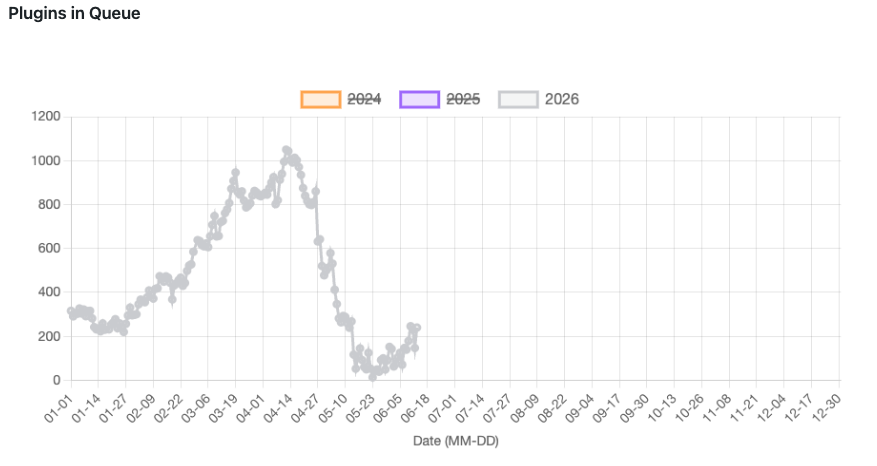
The story in numbers:
In other words: the team absorbed a rising tide of submissions and cleared a huge backlog at the same time. This was achieved thanks to the efforts of both existing and new team members. You are still increasing the number of plugins you submit, and besides plugin reviews we also have many more emails to manage regarding all kind of queries about the directory, its use and guidelines.
We’ve continued to lean on automated tooling to make reviews faster, and AI-assisted checks did help us handle this volume. But we want to be clear about something: these tools support reviewers; they don’t replace them.
Judgement calls, conversations with authors, security context, manage of guideline violations and the many edge cases that don’t fit a pattern all still depend on experienced humans. This is a combination of tooling and committed people working together.
The team is in better shape, but submissions keep increasing, we have new challenges ahead and want to be future-proof. As we announced in March, we’re opening a second round of applications. If you’d like to help keep the plugin directory healthy, secure, and reliable for the millions of sites that depend on it, we’d love to hear from you.
There are still two ways to contribute:
The deadline to apply for this round is 26 June 2026.
If you already submitted it back in March, you don’t need to do it again, we have your submission and it will be taken into account.
I want to apply to join the Plugins Team »
To Marcel, Shiva, and Shameem: thank you for the time, care, and energy you’ve already put in. To the reviewers who mentored them, the rest of the team and to the sponsors who help volunteers to devote their time and cover costs such as the intensive use of AI: thank you. And to everyone who submits and maintain plugins making the plugins directory a trusted place for extending WordPress’s functionality.
X-comment from +make.wordpress.org/docs: Comment on WordPress Documentation Team Closes 200+ Issues — and Needs Your Help
X-post from +make.wordpress.org/meta: Plugin Directory MCP Server


